
This week I have been looking inside public Docker images, with the aim of finding API keys etc. inside, and then reporting them and claiming bug bounties. It has been a partial success, in the sense that I found loads of private credentials inside public Docker images, and a partial failure, in the sense that I have not (yet?) received any bug bounties.
There is an article on this kind of thing from flare.io in December.
Feroz pointed out that all of the low-hanging fruit will have been picked already, and the remaining intersection between companies that leak secrets on Docker Hub, and companies that pay bug bounties, will be approximately 0.
To do this work I built a tool to automatically pull down the latest pushed images on Docker Hub and grep them for secrets. I'm not releasing this because of the obvious potential for abuse.
But I have released a public Docker Explorer tool for looking inside images manually. It's kind of surprising that Docker Hub doesn't have this kind of thing built-in. (Btw, pulling down lots of Docker images is very disk-intensive and my tool is very much vibe-coded, so it is possible that it will fall over soon, sorry).
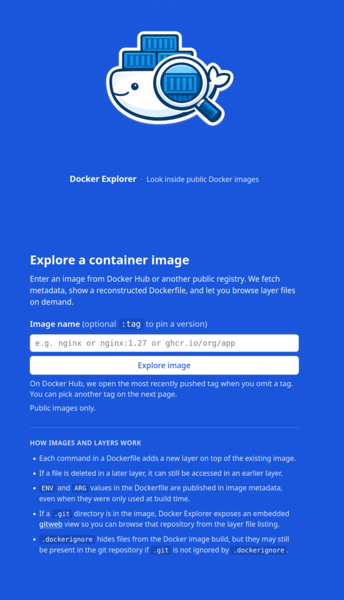
It lets you put in a public Docker image and look at the Dockerfile directives that built it, as well as the file contents of each layer (even if later deleted), extracts .zip and .jar files, and lets you explore bundled git repositories with gitweb.
Docker Explorer is hosted on exe.dev. My brief review of exe.dev is that it is refreshingly geek-friendly, allowing configuration over SSH as well as the web interface. The billing model is a flat monthly fee for resources allocated, regardless of how many VMs you attach to them, which means you avoid the "surprise bankruptcy via AWS" scenario, and you also avoid paying another $10/mo every time you want to add a new VM. It automatically acquires TLS certificates for you, which is very convenient. The biggest downside is that as far as I can tell it only supports HTTP, you can't just run random other services and expose them to the internet. So it would be no good for hosting Protohackers solutions for example. Also no good for hosting a mail server, DNS server, IRC server, etc.; it's only for websites.
From looking in public Docker images so far I have come across:
- AWS keys
- Google Cloud keys
- SSH keys
- Stripe keys
- GitHub access tokens
- GitHub passwords
- OpenAI/Anthropic/OpenRouter API keys
- SMTP passwords
- Telegram bot tokens
- MongoDB passwords
- Postgres passwords
- And an extremely long tail of API keys for various services I've never heard of before
In many cases these seem to be included accidentally (e.g. a developer had the credentials on their local disk when they built the image and didn't realise they would be copied into it), but in probably most cases I think people put them in the image on purpose, to use them, but didn't realise that the image would be public! There is kind of a footgun with the Docker Hub free tier where it only lets you have one private image, and if you push any more images then they are just automatically public. So obviously watch out for that.
Follows a list of ways to publish these things on Docker Hub.
Hard-code the secrets into your source code
main.js:
let aws_access_key_id='AKIAIOSFODNN7EXAMPLE;;
let aws_secret_access_key='wJalrXUtnFEMI/K7MDENG/bPxRfiCYEXAMPLEKEY';
If you're looking to accidentally publish secrets, then you should be doing this already. Hard-coding secrets in the source code means you get to publish them in both your git repository and your container image without any extra work.
Put them in a .env file
.env:
AWS_ACCESS_KEY_ID=AKIAIOSFODNN7EXAMPLE
AWS_SECRET_ACCESS_KEY=wJalrXUtnFEMI/K7MDENG/bPxRfiCYEXAMPLEKEY
Preferably you will commit the .env file to git so as to increase the attack surface. Putting secrets in a .env file makes them particularly easy to find because you can find them just by looking at filenames, without having to grep over the entire codebase.
But even if you don't commit them to git, if you put them in the Docker image with "COPY . ." then they will get included anyway if present on your local machine when you build the image.
Put them in the Dockerfile
Dockerfile:
FROM ubuntu:24.04

ENV AWS_ACCESS_KEY_ID=AKIAIOSFODNN7EXAMPLE
ENV AWS_SECRET_ACCESS_KEY=wJalrXUtnFEMI/K7MDENG/bPxRfiCYEXAMPLEKEY

COPY daemon /app/daemon
ENTRYPOINT ["/app/daemon"]
This does successfully avoid writing the secret to the image filesystem, but it is easy to see that the information is still there, otherwise your daemon wouldn't be able to read it. And in fact the environment variables are straightforwardly stored in the JSON metadata of the image.
ARG is similar but for values that are only present while building the image, rather than running it. These also leak into the image metadata, so I would also suggest putting secrets in ARG directives if you want to leak them.
Delete them at build time
Dockerfile:
FROM ubuntu:24.04

WORKDIR /app

COPY id_rsa /root/.ssh/id_rsa

RUN git clone git@github.com:myorg/myapp && make
RUN rm /root/.ssh/id_rsa

ENTRYPOINT ["/app/myapp"]
If you docker exec -it --rm image bash then you'll find that /root/.ssh/id_rsa has indeed been deleted. But because Docker builds up a container image as a series of "layers" that are applied on top of one another, you are free to extract the content at the layer created by the "COPY" line, and grab out the private SSH key.
Docker Build secrets documentation has suggestions for what to do if you don't want to leak credentials in your public images.
Hide them with .dockerignore
.dockerignore:
.envNow when you copy your working directory into the Docker image with COPY . ., your .env file will be ignored. Boo!
But your .git directory will still be included, so if .env was committed to git then it will still be accessible via the .git directory.
Leave them in .git/config
.git/config:
[remote "origin"]
    url = https://github.com/myorg/myapp
    fetch = +refs/heads/*:refs/remotes/origin/*
[http "https://github.com"]
    extraheader = AUTHORIZATION: basic eC1hY2Nlc3MtdG9rZW46Z2hzX1RoaXNJc05vdEFSZWFsVG9rZW4K
Including your .git directory in the image not only leaks your entire git repository contents, it also leaks the URLs to your remotes (typically just an "origin" on github), which you may want to keep private, and credentials if you have configured any.
Even if your project is open source and your git repository is public, your .git/config may contain secrets that you don't want to be made public. Namely, your github credentials.
When the image is built using the GitHub actions/checkout to clone the repository, it will be a "shallow clone" (i.e. only contains the most recent commit), and will contain a GitHub token which expires when the job finishes, so will be already revoked by the time you see it. The most recent commit still contains the committer name and email address as well as the commit message, so for a private repo it's still worth including if your goal is to leak secrets.
I'd recommend always bundling .git into the image, because you never know, it might work.
Finally: never check
Having built a Docker image, never check it to see if there is anything inside that you didn't expect, that way you won't have to find out if you leaked any secrets and you can sleep easily.
What to actually do, real talk
Obviously, do the opposite of all of this!
Don't commit secrets to git. Don't put .env files containing secrets into your Docker image. That much is obvious.
Less obvious is don't put secrets in the Dockerfile. Don't put secrets into the image and then delete them later on. Don't copy the .git directory into the image.
And maybe glance over your public images on Docker Explorer to check that you aren't leaking anything.